
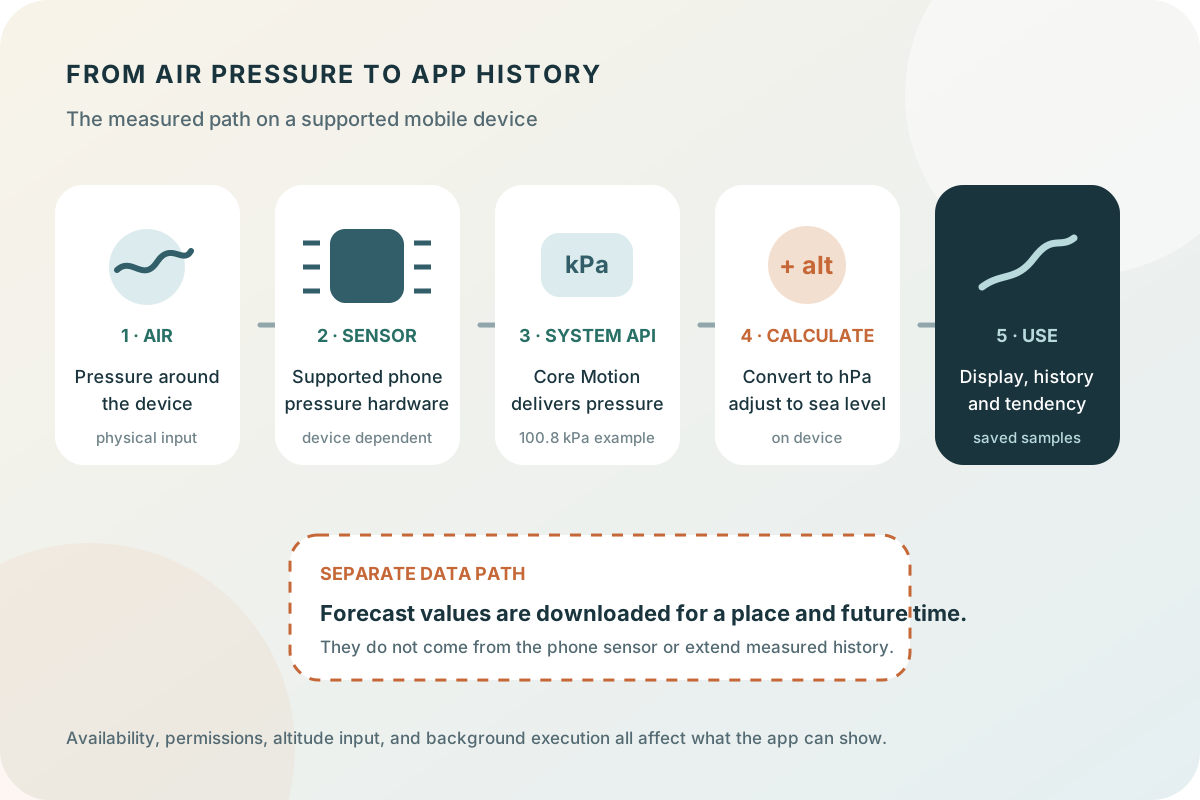
What happens inside a barometric pressure sensor?
Mobile pressure sensors are often MEMS devices: micro-electromechanical systems built at a very small scale. Pressure deforms a sensing structure, and electronics convert the response into a pressure reading. Designs vary. Bosch, for example, documents both piezoresistive and capacitive sensing principles across its pressure-sensor range.
The operating system exposes a usable measurement so the app does not need to interpret the raw electrical signal itself. A sensor specification is not proof that every phone contains that component, however. We do not identify a particular chip inside your device or apply one manufacturer's accuracy claim to every supported phone.
Key takeaways
- Apple introduced the iPhone barometer with iPhone 6 and 6 Plus, but the original iPhone SE is an exception; Android support must be checked model by model.
- The iOS app converts Core Motion pressure from kPa to hPa and uses altitude to estimate sea-level pressure.
- If absolute altitude is unavailable on a pressure-capable iPhone, Barometer requests altitude from Location services.
- A live sensor reading, a saved history sample, and a downloaded forecast are different kinds of data.
What the iOS app actually reads—and what it needs
Barometer checks Core Motion's relative-altitude availability before starting pressure updates. Apple's CMAltitudeData pressure value is provided in kilopascals. The app multiplies it by ten to obtain hectopascals: an illustrative reading of 100.8 kPa becomes 1008 hPa. Changing the display unit does not change the underlying measurement.
Relative altitude is a change from a starting position, not automatically your height above sea level. For altitude context, the app first checks whether absolute-altitude updates are available. Where they are not, it requests an altitude through Location services. This is why pressure and altitude access should not be treated as interchangeable capabilities.
Motion & Fitness permission allows the app to request pressure and altitude data through Core Motion. Location can supply altitude when the device cannot provide absolute altitude directly, and it can select the current city in Forecast. On some device and iOS combinations, Wi-Fi must be switched on for altitude estimation, but it does not need to be connected to a network. Fresh Forecast data is the part that requires an internet connection.
The hardware check is more useful than a blanket statement that all phones have a barometer. Permissions can prevent access even on compatible hardware; an unsupported device is a different situation. Review the app's sensor and permission FAQ and the device manufacturer's specifications rather than assuming that a missing reading is a weather-data outage.
Which iPhones have a barometric pressure sensor?
The first iPhones with a built-in barometer were iPhone 6 and iPhone 6 Plus in 2014. Apple described the barometer as new in its iPhone 6 launch announcement; the preceding iPhone 5s technical specifications list its M7 motion coprocessor, accelerometer, gyroscope, proximity sensor, ambient-light sensor, and Touch ID, but no barometer. Mainline iPhone generations have continued to include one through the iPhone 18 Pro and Pro Max announced in September 2026. The original 2016 iPhone SE is a notable exception; Apple lists a barometer again for the second-generation iPhone SE and third-generation iPhone SE.
A barometer and absolute altitude are not the same capability. The barometer supplies ambient pressure and relative altitude changes. Apple documents Core Motion absolute-altitude updates for iPhone 12 and later. Barometer checks that capability at runtime: when it is unavailable on a phone that can still measure pressure, the app requests an altitude value through Location services before calculating sea-level pressure.
Location altitude is a fallback input to the sea-level calculation; it does not manufacture a pressure reading. A phone without a physical barometer—such as iPhone 5s or the original iPhone SE—cannot become a local pressure sensor merely by granting Location access. Hardware support also does not guarantee that an older phone can install the current app, because current OS and App Store requirements are a separate compatibility question.
| iPhone group | Pressure sensor | Altitude path used by Barometer |
|---|---|---|
| iPhone 5s and earlier | No built-in barometer listed | Location may report altitude, but there is no local pressure measurement |
| iPhone 6 / 6 Plus through iPhone 11 families | Built-in barometer | Location altitude fallback because Apple limits absolute-altitude updates to iPhone 12 and later |
| Original iPhone SE (2016) | No built-in barometer listed | Location alone cannot replace the missing pressure sensor |
| iPhone SE (2nd and 3rd generation) | Built-in barometer | The app checks absolute-altitude availability and uses Location when unavailable |
| iPhone 12 family and later, including iPhone 18 Pro / Pro Max | Built-in barometer | Core Motion absolute altitude when available; runtime fallback remains in place |
Which Android phones have pressure sensors?
Android defines a standard TYPE_PRESSURE sensor that reports ambient pressure in hPa or mbar, but Android does not require manufacturers to include it. Two phones running the same Android version can therefore have different hardware. An Android app should ask the sensor framework for the default pressure sensor at runtime and handle a null result rather than relying only on a brand name.
Official specifications confirm barometers in the examples below, but this is not an exhaustive compatibility list. Product variants, regions, and later revisions can differ, so check the Sensors section for the exact model number you own. Documented examples include Google's Pixel 6, Pixel 6 Pro, and Pixel 11 family; Samsung's Galaxy S20 family, Galaxy S24, and Galaxy A54 5G; and Sony's Xperia 1.
Android can calculate altitude from pressure when an appropriate sea-level reference pressure is known. If an app substitutes the standard 1013.25 hPa reference, Android warns that absolute altitude will not be accurate. Location APIs can separately provide altitude from the best available location sources, but—as on iPhone—a location altitude cannot replace the missing ambient-pressure measurement on a phone without TYPE_PRESSURE.
The Barometer app implementation described on this page currently uses Apple's Core Motion path. The Android examples explain comparable phone hardware and platform behavior; they do not imply that the iOS app is available for Android.
| Manufacturer | Verified examples | What to verify |
|---|---|---|
| Pixel 6, Pixel 6 Pro, and Pixel 11 family | The exact model's Sensors list says Barometer | |
| Samsung | Galaxy S20 / S20+ / S20 Ultra 5G; Galaxy S24; Galaxy A54 5G | Check the regional product specification and model number |
| Sony | Xperia 1 | Check the exact Xperia generation rather than assuming the whole range matches |
From measured pressure to sea-level pressure
The sensor reports pressure where the device is located. Since pressure generally decreases with height, a reading from a hill should not be compared directly with an adjusted coastal weather report. Barometer combines measured pressure with altitude using a standard-atmosphere approximation to estimate the corresponding sea-level pressure.
This calculation is done on device, but it remains an estimate. If the altitude input changes or is inaccurate, the calculated sea-level value can change too. A weather provider may use a different reduction method or a different elevation, so two sea-level values need not match exactly.
For a fair comparison, first understand the difference between measured pressure and sea-level pressure, then use the same units, timestamp, and location. Do not manually offset a sensor reading just to make it match an unrelated city forecast: that can hide a surface-versus-sea-level mismatch rather than correct the instrument.
How to read the result on mobile
Start by reading direction, magnitude, and time together rather than judging the current number in isolation. Check whether the history curve is rising, falling, or nearly steady, then note the size of the change and the time it took. Barometer's tendency label summarizes sea-level-pressure measurements from the previous three hours; the full graph provides the detail behind that label.
Read altitude and units alongside the curve. A meaningful climb or a move between floors can affect pressure at the device, while sea-level pressure is intended to make comparisons across elevations easier. Choose hPa or inHg to match the forecast or reference you use; changing units only changes the display, not the measurement or trend.
Use saved history to compare the current pattern with earlier days, and attach a short note when weather, travel, an outdoor decision, or a symptom makes the moment worth remembering. The app stores a note with its specific measurement, so later review has context that the graph alone cannot preserve.
Accuracy, resolution, and useful comparisons
Resolution describes the smallest reported step; accuracy describes closeness to a reference. A display with more decimal places is not necessarily more accurate. In a mobile app, the sensor, its integration, system processing, and the altitude correction all contribute to what you finally see.
To investigate an unexpected difference, keep the phone at a consistent elevation and compare readings taken at the same time. Note whether you moved between floors, traveled uphill, changed units, or compared against a forecast rather than a nearby observation. Check those explanations before assuming the sensor needs calibration.
Barometer is intended for everyday pressure awareness. The app does not certify a phone as a laboratory instrument or provide a guaranteed error bound for all devices. Use equipment and procedures appropriate to any safety-critical measurement.
What works offline, and what requires a forecast download?
The on-device pressure measurement, sea-level calculation, saved history, and notes are generated or stored locally and do not require a weather API response. Barometer does not require an account. Forecasts are separate: they use downloaded data for a selected place and time. Previously downloaded forecast data can be viewed offline, but an internet connection is needed to obtain fresh data.
History is also different from a continuously running stream. The iOS implementation saves samples and stops sensor updates between collection opportunities; iOS controls background execution. The guide to improving pressure history collection on iOS explains those limits. Missing or uneven history intervals therefore do not establish that the physical sensor is inaccurate.
Once a measurement is saved, a note can explain what was happening at that time. This is particularly useful when reviewing a pressure change during travel, a fishing trip, or a symptom day. Use history for the observed past and the separate pressure forecast tool for the modeled future rather than blending them into one continuous record.

